JL55 Withdrawal & GCash Deposit Walkthrough: 4 to 8 Minute Payouts
21+ Responsible Gaming • October 2026₱100 Min Cash In • ₱200 Min Cash Out • 4 to 8 Min Payout
Open GCash Cashier in Member Center Back to Main Payments & Cashier Page✓ Verified Direct QR Ph Gateway 21+ Only • Requires Fully Verified Personal GCash Account
| Payment Channel | GCash Direct Link & QR Ph |
| Minimum Cash-In Limit | ₱100 PHP (Instant Balance Credit) |
| Minimum Cash-Out Limit | ₱200 PHP (Zero Processing Fee) |
| Single Payout Cap | ₱50,000 PHP per Transfer |
| Standard GCash Monthly Cap | ₱100,000 Incoming (₱500,000 on GCash Plus) |
| Verified Payout Speed | 4 to 8 Minutes (24/7 Automated Queue) |
Starting a ₱100+ top-up inside the v4.7.2 mobile app opens your GCash MPIN screen directly and brings you right back to the game lobby.
Check your exact finished versus needed betting down to the last peso inside the withdrawal tab before sending a payout request.
Withdrawing ₱5,000 sends the full ₱5,000.00 straight into your GCash balance without hidden handling fees or cashier cuts.
Step-by-Step GCash QR Ph Deposit Steps (₱100 Minimum)
Adding money to your playable wallet is built so you never have to type long account numbers by hand. After signing in and opening the main PHP cashier, pick either "GCash Direct" or "QR Ph Express" and type any amount from ₱100 to ₱50,000. The cashier creates a secure, one-time QR code good for 5 minutes.
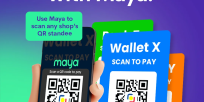
If you are playing on one phone, tap "Save QR to Gallery", open your GCash app, tap the bottom-center "QR" scanner button, and pick "Upload QR" from your photo gallery. Check the exact peso amount and approve with your MPIN; our system spots the payment and updates your casino balance within 3 seconds.
Remember that every deposit needs a fresh QR code made inside the cashier. Never reuse an old QR screenshot from an earlier day, and never type casino words inside GCash payment notes.
How the 4 to 8 Minute JL55 Withdrawal Queue Works
When you send a jl55 withdrawal request starting at ₱200, our automated payout system checks three things in under 30 seconds: your finished turnover bar, your single-account safety log, and your matching GCash name. Once cleared, the payout goes straight to our GCash transfer line, landing in your mobile wallet within 4 to 8 minutes.
First-time withdrawers who claimed an offer from our promotions page should check the turnover progress bar before sending a cashout. If you claimed a deposit match and still have ₱400 left in turnover, the withdrawal screen will show the exact remaining bet amount needed on 100%-counted slot games.
For a clear breakdown of how deposit-plus-bonus turnover works, read our turnover calculator page.
How to Avoid the Top 3 GCash Payout Delays in the Philippines
Aside from unfinished bonus turnover, the most common reason a GCash payout bounces back to a player’s casino balance is hitting GCash’s own ₱100,000 monthly incoming limit for standard Fully Verified wallets. If your GCash account has already received ₱92,000 in transfers this month and you ask for a ₱15,000 casino cashout, GCash will block the incoming transfer.
Whenever you get close to your monthly GCash incoming limit, simply link a backup wallet or bank account using our Maya and InstaPay cashout page so your payout goes through on the first try. Make sure your linked wallet name matches your registered member name 100%.
How to Scan a Deposit QR Code Using Only One Phone
More than 85% of Filipino players make deposits and request a jl55 withdrawal on a single smartphone instead of scanning a laptop screen. To finish a ₱100+ QR Ph deposit on one phone in 15 seconds, tap "Save QR Image" on the deposit screen so the picture saves to your photo gallery.
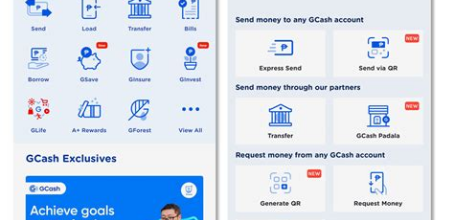
Next, open your GCash app, tap the blue **QR** button at the bottom center, and tap **Upload QR** in the top-right corner of the scanner screen. Pick the saved QR picture from your gallery, check that the peso amount matches, and type your 4-digit MPIN.
Delete the old QR screenshot from your photos afterward so you never accidentally scan an expired code next time.
Avoiding the ₱100,000 Monthly GCash Incoming Limit
Standard Fully Verified GCash wallets have a ₱100,000 monthly incoming limit and a ₱100,000 wallet balance cap. Every peso sent to your GCash—from friends, salary, or casino cashouts—counts toward that ₱100,000 monthly limit, which resets on the 1st of each month.
If you hit a big win on JILI Money Coming or Gates of Olympus that would push your GCash past ₱100,000 for the month, either link a bank account inside GCash to upgrade to GCash Plus (₱500,000 limit) or cash out through our Maya and InstaPay bank option.
How to Withdraw Winnings to GCash Without Delays
Go to Account Center > Cashier > Withdrawal and check that your Required Turnover bar reads ₱0.00 (Unlocked).
Select your verified GCash number from the list and type a whole-peso withdrawal amount between ₱200 and ₱50,000.
Type your withdrawal PIN and tap Confirm; your money will arrive in your GCash wallet with an SMS receipt within 4 to 8 minutes.
Quick Speed & Payment Check (payments/gcash-cashout)
| Last Checked | |
| Manila Server Speed | 19ms on PLDT, Globe & Smart |
| Main Topic | JL55 WITHDRAWAL (jl55 gcash cashout) |
| Deposit & Cashout Limits | ₱100 Min Deposit / ₱200 Min Cashout |
| Usual Payout Time | 4 to 8 Minutes via GCash, Maya & InstaPay |
| Phone App Version | v4.7.2 (38.4 MB Android APK & iPhone Safari) |